
Tattoo shop
The tattoo shop sells the game's tattoos, priced from their GTA Online price (× priceFactor, 0.25 out of the box), your server's addon tattoos and the hair fades, by body zone. While a player is in the shop, their clothes come off so the skin shows. When they leave, the clothes go back on.
It's for the freemode characters, the man and the woman.
The entrance
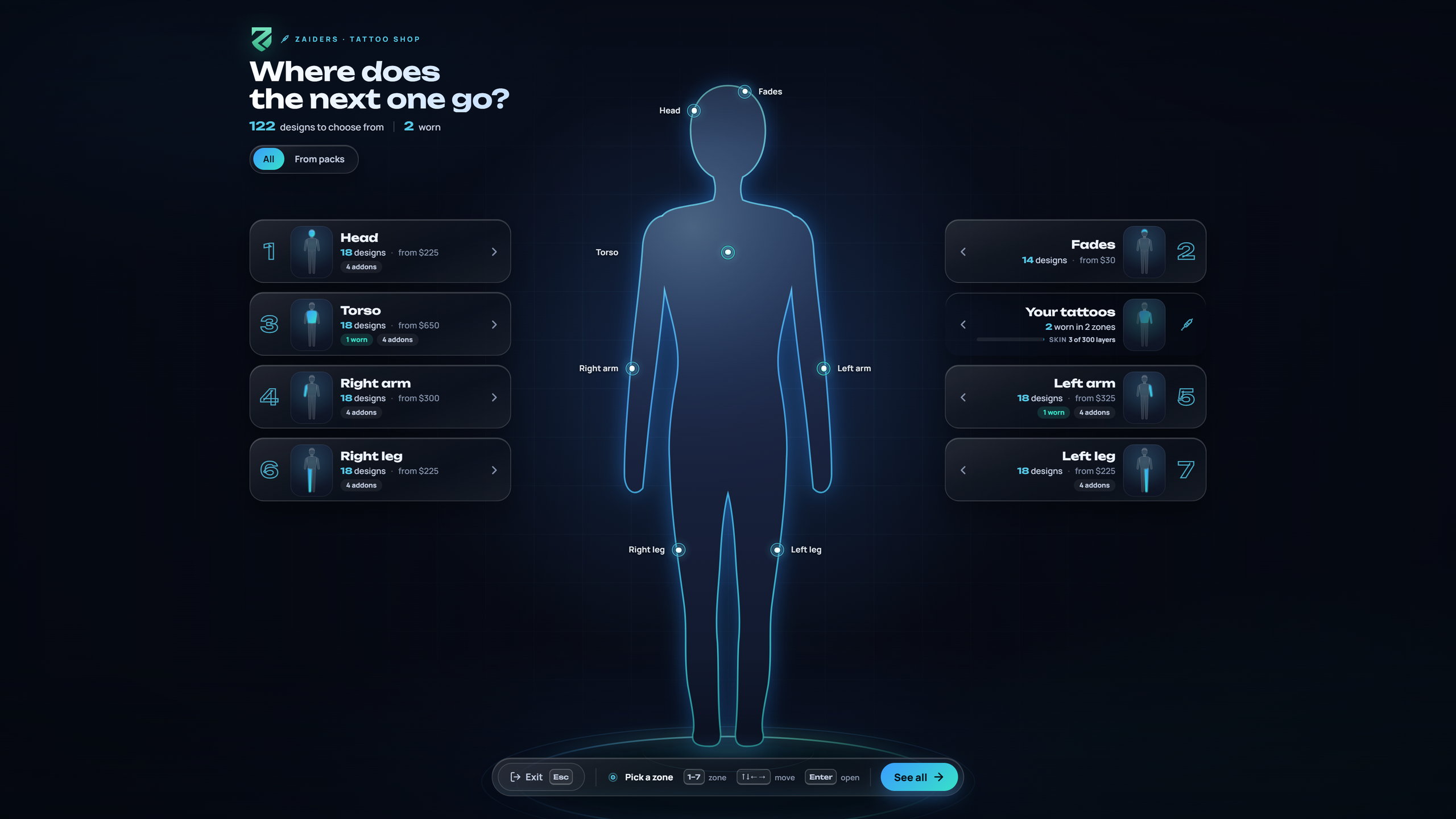
The shop opens on the whole body, seen from the front. Click a zone's card, its dot or its name on the body, or its number key. Each zone has the same number everywhere, on the cards, the list's tabs and the keys: 1 Head, 2 Fades, 3 Torso, 4 Right arm, 5 Left arm, 6 Right leg and 7 Left leg. Each dot has the zone's name beside it; pointing at one shows the zone's number and how many designs it has. Your tattoos shows everything the player wears, from every zone. When your server has addon tattoos, All or From packs at the top shows every design or only the addon ones. With changes not paid yet, Buy (B) pays without leaving the entrance.
The first time the entrance shows in each opening, a short tour lights up each zone in turn; the first touch stops it. Each zone's card also says what its designs cost, from $X. Esc or the ✕ with changes asks first: the purchase opens over the list, or You have unsaved changes when the changes are free (Keep editing goes back to the entrance). See Leaving with changes.
Choosing a tattoo
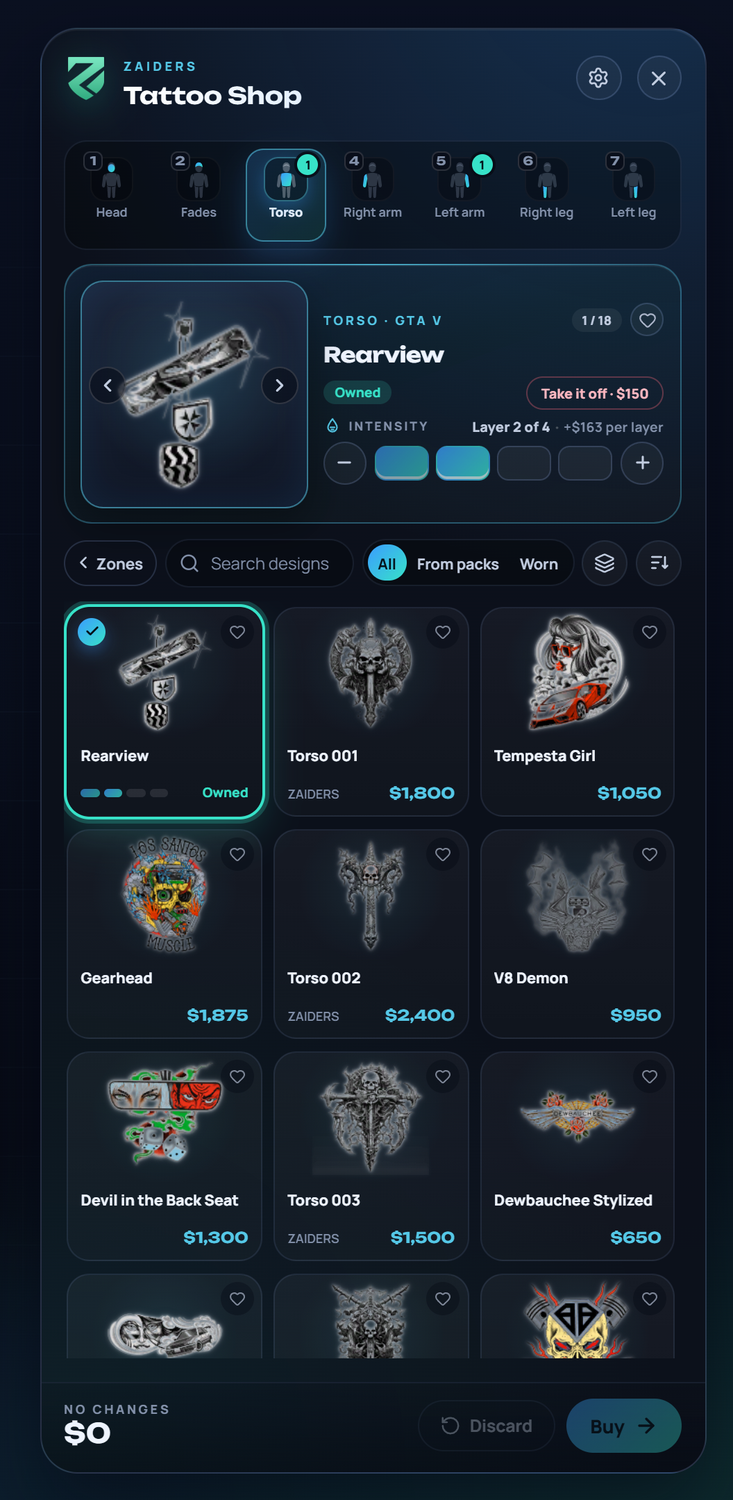
Each zone lists its tattoos with their picture, name and price, and the pack under addon ones. Names come without the pack's prefix, and a name that is only a number shows as Tattoo #004. Tags say Owned, Trying on or Removing, and dots show a design's intensity. Click one to try it on.
The chosen one also shows big at the top, with its price, its Intensity, ◀ ▶ to the previous and next design, and n / total next to the heart. Each cost shows where it's decided: Take it off · $150, Lightening it: $X, +$X per layer or Free. From 80 % of the skin used, a meter says how much ink still fits (N layers left).
- Search by name or pack. With no match, Also in: shows the other zones that have it.
- All, From packs (when your server has addon tattoos) or Worn filters the list. Collections, Favorites only and Sort narrow it down.
- ‹ Zones goes back to the entrance.
- The zone chips at the top, with their names, switch zones, and show how many tattoos the player wears in each.
- When a design goes on the back or on one side, the camera turns there by itself. See the back turns it by hand.
Darker layers
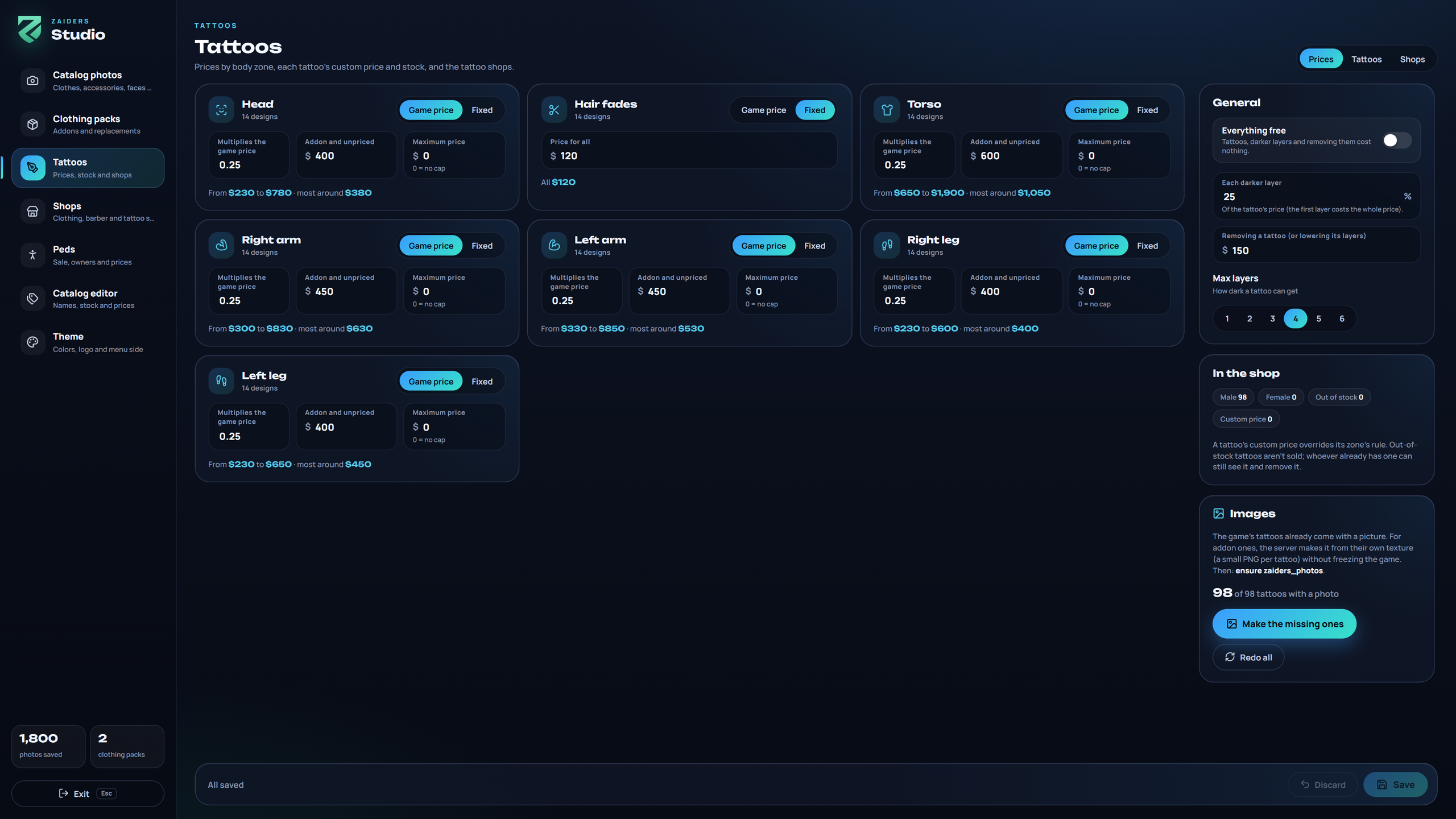
The game has no opacity for tattoos, so a darker tattoo is the same tattoo put on again. Intensity adds or takes away layers, up to Config.Tattoos.maxLayers (4 by default). Each extra layer costs a part of the tattoo's price (layerPercent, 25% by default).
Tattoos on top of each other
A tattoo can go over another one, and both stay on. Players can combine designs in the same place.
Removing a tattoo
The first click on a tattoo the player owns only shows it at the top. Take it off (or a second click) marks it to be removed, and Keep it undoes that. Removing a tattoo, or lowering its layers, costs Config.Tattoos.removePrice, and the button shows the price.
Turning extras off
Each extra of the shop can be switched off in Config.Tattoos.ui: the keys, the favorites, sorting, the chosen design at full resolution, See the back, the entrance's guide, the skin meter, the zone names on the body and the camera turning by itself. See Config reference: tattoo shop.
Which tattoos show
- The game's tattoos come with their GTA Online price and their names in English and Spanish. Only the ones your server's game build has are shown.
- Your addon tattoos, from packs that load a
PED_OVERLAY_FILE, show up on their own, by zone. - Hair fades are tattoos of the head, in their own zone.
Each tattoo shows a picture. The game's tattoos show their own picture. For addon tattoos, the server can make a small picture of each one: in the panel, Tattoos → Images, or the console command zappearance_tattoo_images. Then run ensure zaiders_photos so players get them. See Catalog photos.
Addon tattoo packs
Any addon tattoo pack works, with nothing to set up in ZAIDERS Appearance:
- Put the pack in
resourcesand addensurewith its folder name toserver.cfg. - Restart the server. The shop lists the pack's tattoos by zone, and From packs shows only them.
- Optional: make their pictures in the panel (Tattoos → Images), then
ensure zaiders_photos.
The shop reads what the game loads: the overlay files that the pack's fxmanifest.lua (or __resource.lua) loads with data_file 'PED_OVERLAY_FILE'. Every addon tattoo pack has them, and patterns such as 'xml/*.xml' or 'data/**.xml' work. The game names each collection after the <nameHash> that follows </presets> in that file, not after the file. A file without it loads, but none of its tattoos can be put on, so they stay out of the shop and F8 says the game does not have collection .... The shop reads that same <nameHash>, so a pack whose file isn't named like its collection works too. Only started packs count. A stopped pack's tattoos leave the shop, and players keep them saved for when it comes back.
Every player needs the same packs, which happens by itself because they all download them from your server. A tattoo from a pack that a player's game didn't load can't be shown on that player's screen.
Names and pack
A tattoo's name comes from the pack's own tattoo shop file (TATTOO_SHOP_DLC_FILE), when the pack has one and registers its names. Otherwise the shop shows its preset name. A pack can also add two lines to its fxmanifest.lua:
tattoo_pack_name 'My Tattoos'        -- what the shop calls the pack (else its collection, made readable)
tattoo_renames 'data/renamed.json'   -- the names its tattoos had before: saved ones move to the new names
renamed.json is { "renames": [["old collection", "old preset", "collection", "preset"], ...] }. An old name only moves when its collection is no longer loaded, so a player who bought a tattoo under its old name keeps it. The panel's own price and out-of-stock mark of a renamed design move with it too (saved under the new name the next time the panel saves). Players' favorite hearts don't move: they mark the renamed designs again.
Prices
| Tattoo | Price |
|---|---|
| The game's | Its GTA Online price × priceFactor (0.25: a $10,000 tattoo costs $2,500). maxPrice sets a ceiling. |
| Addon, or the game's without a price | addonPrice: 'auto' uses its zone's typical price × the factor, or set a number. |
| Hair fades | fadePrice ($120). |
| Each darker layer | layerPercent % of the tattoo's price. |
| Removing | removePrice ($150). |
All of this can be changed in the panel: Tattoos → Prices has one rule per zone (Game price × a factor, or Fixed) and shows the range of prices it gives. Tattoos → Tattoos sets each tattoo's own price and stock, many at once with the checkboxes. Everything free makes the whole shop free. See ZAIDERS Studio.
A tattoo shop with its own percentage in the panel (Shops → the shop → Catalog and prices) charges every tattoo, darker layer and removal at that percentage.
Out of stock
A tattoo out of stock isn't sold and can't be put on. A player who already has it still sees it, marked, and can remove it.
Saved tattoos
Bought tattoos are saved in the zaiders_tattoos table, which is created by itself. They go on when the character joins, and again whenever another script changes the ped. This works on any framework, whatever resource loads the clothes.
Tattoos that illenium-appearance or fivem-appearance kept inside each saved look come over by themselves the first time each character enters: only the designs this shop sells, with their darkness as layers (Config.Tattoos.importFromLooks). zappearance_migrate tattoos confirm brings everyone's at once. On ESX with esx_skin they only come with that command: run it right after installing. See Coming from another menu.
A copy of each character's tattoos is kept inside their saved look, so a character screen that shows saved looks shows the tattoos too (Config.Tattoos.inSavedLook).
What other players see
On its own, the game shows other players only part of each player's tattoos. It sends them in a fixed block of 1,792 slots, one per design, and the game's own tattoos already take about 1,600 of them. Designs past that are never seen by the others, and which ones fall off can change between restarts (FiveM issues #2010 and #3092). Darker layers never travel, and addon tattoos made not to use that block don't travel at all.
So ZAIDERS Appearance shows every player's tattoos to the others itself:
- Each player's game reads the tattoos on that player's own character and sends them to the server, which passes them to the players around.
- The others put exactly that list on that player: the game's tattoos, the addon ones and the hair fades, each with its layers.
- The list goes on again when the player changes tattoos or clothes, when they come near, and every few seconds up close, in case the game puts its own copy back.
- While a player tries tattoos in the shop, the others keep seeing what that player wears.
- A list keeps up to 200 tattoos and 300 layers, 8 per tattoo. Past that, the first ones put on stay, the same on every screen, and the shop adds no ink the others wouldn't see.
- After
ensure zaiders_appearance, everyone keeps their tattoos with their layers.
It needs OneSync on (not legacy), works with sv_stateBagStrictMode, and turns on FiveM's game_enableStableOverlaySort fix by itself. Without OneSync, or with legacy, the server console says so once, and players see what the game sends. Config.Tattoos.sync = false turns it off. It also stays on with another tattoo resource: see below.
Tattoo packs with their own sync
Some tattoo packs bring a script that shows their tattoos to other players. Turn that script off in the pack's config, or two scripts would put tattoos on the same players. ZAIDERS Tattoos steps aside by itself. A pack's author can do the same with the syncsTattoos export.
Using another tattoo resource
Config.Tattoos.enabled = falseturns this tattoo shop off.- If a resource from
Config.Tattoos.ownersis running, the shop turns itself off with no change on your part. Its shops leave the map, nothing is sold, and saved tattoos aren't put on, so the two never clash. The panel's Tattoos section and the server console say which resource took over. Stop that resource and the shop comes back. - The list comes with rcore_tattoos, qb-tattooshop, esx_tattooshop, xnTattoos, illenium-appearance, fivem-appearance and bl_appearance. If your tattoo resource runs under another folder name (for example
illenium-appearance-main), add that name. vMenu isn't on it on purpose: on most servers it's an admin menu, and listing it would turn this shop off everywhere. Neither is dx_clothing, which this menu replaces.
The sync stays on, with the shop off or with another tattoo resource: the others still see each player's tattoos as they wear them, each tattoo once, because another resource's layers can't be read. What a player tries on in that resource's shop isn't sent: the list waits while they're in another menu (a screen with the mouse or a scripted camera, 60 seconds at most), and for 3 seconds after their ped changes, while that resource puts the tattoos back. That resource can also say it with setTattooBusy. Config.Tattoos.syncWaitMenus = false turns those waits off.
When this menu changes the player's model for good, it fires zaiders_appearance:modelChanged, so the other resource can put its tattoos back on the new ped. On ESX, while skinchanger isn't running, it also fires skinchanger's own skinchanger:modelLoaded, which ESX tattoo shops already listen to.
Related
- Config reference: tattoo shop
- Map shops & blips
- Barber shop
- ZAIDERS Tattoos, our addon tattoo pack